Play
Phone Case DIY 5 Creative Game
Showtime

Phone Case DIY 5 Creative Game

Family
Developer: Union Force Studios
Published: 2024-02-27
Updated: 2026-06-12

Phone Case Diy 5 offers a polished 3D design experience that children find captivating. The variety of patterns and stickers encourages repeated play, and the album feature lets kids showcase their work. The game is intuitive enough for young children to use independently. It promotes creativity and fine motor skills without any stressful elements. A great choice for parents seeking a safe, educational art game.

Plays in your browser — no install.

About this game

Game Introduction

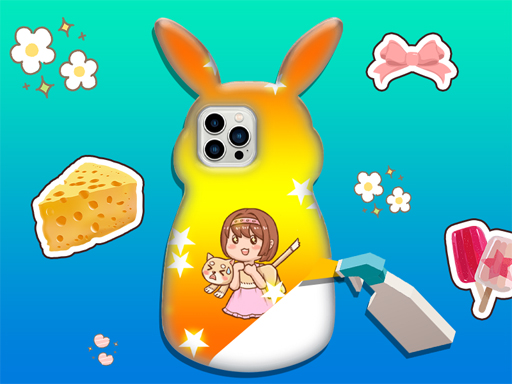
Phone Case DIY 5 Online Creative Game is a family-friendly design game where players create personalized phone cases. It offers a 3D workspace that makes each design feel realistic and immersive. The game encourages artistic expression by letting children explore patterns, stickers, and decorations to craft unique cases. It is part of a popular series known for sparking imagination in young players.

How to Play

Players start by selecting a phone case base in a 3D environment. They can then browse through a collection of patterns, stickers, and decorations. Using simple drag-and-drop controls, players place items onto the case. Elements can be resized, rotated, and moved to achieve the desired look. Layers of stickers and patterns can be combined for a unique design. Once satisfied, players save their creation to an album for later viewing or editing.

Game Features

The game includes a 3D design environment that adds depth to creations. It provides a library of patterns, stickers, and decorations. An album feature allows players to save and review their designs. Controls are simple and intuitive, suitable for young children. The game has no in-app purchases or third-party ads. Regular updates may introduce new content to keep the experience fresh.

Tips for Success

Experiment with different combinations of patterns and stickers to discover unique styles. Use the rotate and resize tools to fine-tune the placement of each element. Save your designs frequently to build a portfolio of creations. Take inspiration from real phone case designs or your favorite colors. Practice layering stickers to create depth and interesting visual effects. Share your album with family for encouragement and new ideas.


Compatibility

✅ This game supports:
- Desktop browsers (Chrome, Edge, Safari)
- Mobile browsers (Chrome on Android, Safari on iOS)
❌ Does NOT support: - Internet Explorer - Very old browser versions
👉 Try refreshing or updating your browser
FAQ
Is this game suitable for very young children?
Yes, the game is designed with simple drag-and-drop controls that are easy for young children to use without help. It provides a safe, family-friendly environment with no inappropriate content or ads, making it suitable for kids as young as preschool age.
Can I play this game on a tablet or smartphone?
The game is designed for online play and may be accessible on various devices with a web browser. Since it is a clicker-style creative game, touchscreen devices like tablets and smartphones typically work well with the drag-and-drop controls.
Are there any costs or in-app purchases?
No, the game has no in-app purchases or third-party ads. All features, including the library of patterns, stickers, and decorations, are available without any additional cost, making it a completely free creative experience.
How many designs can I save in the album?
The game includes an album feature that allows you to save your creations. While the exact number of saved designs is not specified, you can typically save multiple projects and return to edit or view them later.
Does the game require an internet connection?
As an online creative game, it likely requires an internet connection to load the 3D workspace and access the design library. However, saved designs in the album may be viewable offline depending on the game's implementation.
Can I share my designs with friends?
The game focuses on personal creativity and saving designs to an album. While sharing features are not explicitly mentioned, you may be able to show your creations to family and friends by viewing them together on the same device.
Advertisement

Games You Might Enjoy