Play
Color Art Puzzle Game
Showtime

Color Art Puzzle Game

Puzzle
Developer: Grass Veil Digital
Published: 2026-02-04
Updated: 2026-07-05

Color Art Puzzle Game provides a calming digital coloring experience with a wide variety of images. The intuitive controls work well on both desktop and mobile devices. The lack of time pressure allows for creative exploration, and the ability to save and share artwork adds to the fun. It is an excellent choice for stress relief and creative expression.

Plays in your browser — no install.

About this game

Game Introduction

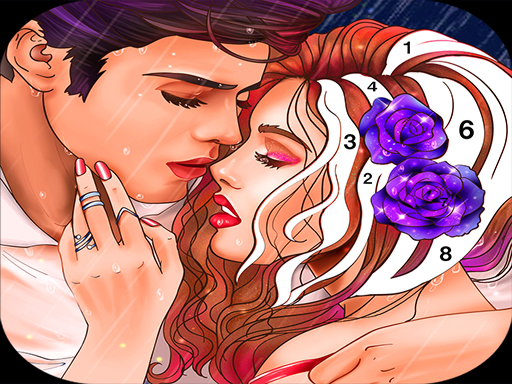
Color Art Puzzle Game is a relaxing online activity that combines the joy of coloring with puzzle-like creativity. Designed for players of all ages, it offers a digital space to color various images without the mess of physical materials. The core objective is to select a picture and fill its sections with colors to create a finished artwork. This game stands out by providing a peaceful, screen-based creative experience that can be enjoyed during short breaks or longer sessions.

How to Play

To play, players typically start by choosing an image from a selection displayed on the main menu. Using a mouse or touch screen, they pick a color from a palette and then click or tap on any section of the picture to fill it with that color. There is no timer, allowing players to work at their own pace and experiment with different color combinations. Once the coloring is complete, players can save or share their finished artwork. The controls are simple and intuitive, making it easy for anyone to start coloring immediately.

Game Features

Color Art Puzzle Game includes a variety of images to color, each with fun characters and scenes. The interface is designed to be easy to use with both mouse and touch inputs. Players can save and share their finished artwork. The game has no time limit, providing a stress-free coloring experience. It is suitable for all ages and requires no special skills or prior experience. The straightforward design makes it accessible to beginners and experienced colorists alike.

Tips for Success

To get the most out of Color Art Puzzle Game, take your time and enjoy the process without rushing. Experiment with different color combinations to see what looks best. Start with simpler images if you are new to digital coloring, then move on to more detailed ones. Use the save feature to keep a copy of your favorite artworks. Sharing your creations with friends or family can add to the fun. Most importantly, relax and let your creativity flow.
Compatibility

This H5 game runs smoothly on:
• Desktop computers (Windows / Mac) • Mobile phones (iPhone / Android)
• Tablets (iPad / Android)
🌐 Best experienced with Chrome, Safari, or Edge
FAQ
Can I play Color Art Puzzle Game on my mobile device?
Yes, the game is designed to work with touch screens, so it is compatible with most smartphones and tablets. You can tap directly on the sections to fill them with color, making it easy to play on the go.
Is there a cost to download or play Color Art Puzzle Game?
The game is typically free to play online. There may be optional in-app purchases for additional image packs or premium features, but the core coloring experience is available without any payment.
Does Color Art Puzzle Game require an internet connection?
An internet connection is needed to load the game and access the image library. Once an image is loaded, you can color it offline in some versions, but saving and sharing may require reconnection.
Can I print my finished artwork from Color Art Puzzle Game?
Some versions of the game allow you to export your completed artwork as an image file, which you can then print. Check the save or share options within the game to see if this feature is available.
Are there different difficulty levels in Color Art Puzzle Game?
The game offers a range of images from simple to detailed. Beginners can start with less complex pictures, while more experienced colorists can choose intricate designs. There are no formal difficulty levels, but the variety of images provides a natural progression.
Can I undo a color fill if I make a mistake in Color Art Puzzle Game?
Many digital coloring games include an undo feature. In Color Art Puzzle Game, you can typically reverse your last action by using the undo button, allowing you to correct mistakes and try different color combinations without starting over.
Advertisement

Games You Might Enjoy