

Melody & Motion Timing Quest
Runs in your browser — no download.
Reviews
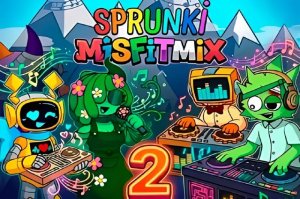
Melody & Motion Timing Quest delivers a focused rhythm experience that respects the genre's core appeal. The remixed soundtrack offers fresh takes on familiar tunes, and the dual modes give players control over their play style. Story mode provides light narrative context, while free play is perfect for practice. The open-source development model means the game can grow with community input, which is a rare and welcome feature. Controls are simple arrow keys, keeping the barrier to entry low. For a free, ad-free game, this is a solid choice for anyone who enjoys timing-based challenges.
Description
Core Gameplay Loop
Players respond to on-screen arrow prompts that appear in sync with a musical track. The goal is to press the matching arrow key on the keyboard as each symbol reaches a designated target zone. Success keeps the music flowing, while too many missed cues cause a reset. This straightforward interaction forms the foundation of every session, whether in story or free play mode.
Two Distinct Play Modes
Story mode presents a narrative sequence where each song advances a storyline. Free play mode lets users select any unlocked track to practice or enjoy without progression pressure. Both modes share the same core mechanics but serve different purposes: one for guided play, the other for skill building or casual enjoyment.
Soundtrack & Visual Style
The game features a collection of remixed songs that reinterpret familiar melodies. Each track has its own tempo and rhythm pattern, requiring players to adapt their timing. The visual presentation is clean and focused, with arrow indicators clearly displayed against the background. This design keeps attention on the music and input cues.
Open Source Community
Being open source, the project invites contributions from developers and artists. This means the soundtrack, visuals, and even gameplay logic can be modified or expanded by the community. Players may encounter custom content or variations created by others, adding variety beyond the original release.
Accessibility & Skill Curve
The controls are limited to four arrow keys, making the game easy to pick up for newcomers. Difficulty increases naturally with faster songs and more complex arrow patterns. Beginners can start with slower tracks in free play mode to build confidence, while experienced players can tackle higher-tempo songs for a greater challenge.








03 Comments
Sign in to comment
You must be logged in before posting a review or rating.
No account? Create one
No comments yet. Be the first to comment!