Cozy Nursery Design Studio
Reviews
💡Cozy Nursery Design Studio offers a peaceful and creative experience for players of all ages. The drag-and-drop interface is simple to use, and the wide selection of furniture and decorations allows for endless customization. The game's focus on a single theme makes it unique among design games. It is free, requires no downloads, and runs smoothly on any device. A wonderful way to unwind and express creativity.
Description
Game Introduction
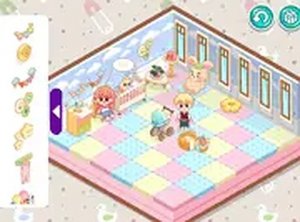
Cozy Nursery Design Studio is a browser-based activity where players arrange furniture and decorations to build a comfortable room for a baby. The goal is to create a space that feels both welcoming and practical, using a variety of items such as cribs, rugs, wallpapers, and toys. Unlike many general design games, this one focuses entirely on nursery themes, allowing players to explore a wide range of cute and specialized decorative pieces. The game is designed to be stress-free, with no timers, scores, or pressure to finish quickly. Players can experiment with different color schemes and layouts at their own pace. The simple drag-and-drop interface makes it easy for anyone to participate, including young children. Since it runs directly in a web browser, there is no need to download or install anything. This makes it accessible on computers, tablets, and smartphones. The core appeal is the freedom to express personal style while creating a warm, functional environment. It is especially suited for those who enjoy interior design, planning, or relaxing creative hobbies.
How to Play
Players start by selecting a room layout and a color scheme for the walls. Using a mouse or touch screen, they browse through categories like furniture, wall designs, and toys. Items can be dragged and dropped into the room, and then moved or rotated to achieve the desired arrangement. Larger pieces, such as cribs and changing tables, are typically placed first, followed by smaller decorations like lamps, rugs, and stuffed animals. The game allows players to change colors, swap items, or remove anything they don't like. There are no timers or scores, so everyone can take as much time as they need. The interface is intuitive, with clear icons and labels, making it easy for both children and adults to start designing immediately.
Game Features
Features include a variety of furniture items, wall patterns, and decorative toys. The game is free to play and requires no downloads or registration. It supports full-screen mode for an immersive experience. Players may also have options to change flooring or background elements. The game runs on any device with a web browser, including computers, tablets, and smartphones. Designs can be saved, allowing players to return and continue later. The interface is user-friendly, with simple controls suitable for all ages. The game is regularly updated with new items and themes, providing fresh content over time.
Tips for Success
Begin by selecting a cohesive color palette, such as soft pastels or bright primary colors. Place larger furniture first to establish the room's layout, then add smaller decorations to fill empty spaces. Experiment with different arrangements and wall designs until the room feels balanced and inviting. Avoid overcrowding by distributing items evenly. Taking your time and trying various combinations will help you create a space that is both functional and visually pleasing.
Compatibility
Faq
Can I save my nursery design and come back later?
Is there a cost to play Cozy Nursery Design Studio?
What devices can I use to play this game?
Are there age restrictions for playing?
Does the game require an internet connection to play?
How often are new items added to the game?
Related Titles

Bubble Pop Puzzle Arcade

We Bare Bears: Track Stack Puzzle

Pet Match Link Puzzle

Candy Launch Puzzle Game

Jeep Adventure Puzzle Game

Sea Life Match 3 Puzzle
Cartoon Puzzle Fun for Kids

Prado Offroad Parking Simulator

Zipline Puzzle Adventure