

Personal Vehicle Design Studio
Runs in your browser — no download.
Reviews
Personal Vehicle Design Studio succeeds by keeping things simple. There are no timers, scores, or fail states, just a clean interface for choosing colors, wheels, and decals. The instant preview helps players see how each change affects the overall look, encouraging experimentation. While it lacks the depth of professional design software, its accessibility makes it perfect for younger players or anyone seeking a low-stress creative outlet. The family-friendly presentation ensures peace of mind for parents.
Description
Creative Freedom at Your Fingertips
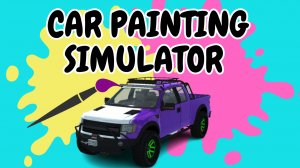
Personal Vehicle Design Studio places the player in control of a virtual garage where the only task is to craft a vehicle that matches their personal taste. The game removes all pressure of competition or time limits, allowing for unhurried exploration of visual combinations. Players can cycle through a palette of body colors, from metallic finishes to matte tones, and see how each shade transforms the car's character. The interface responds immediately to selections, making it easy to compare options side by side. This straightforward approach ensures that even first-time users can jump in and start designing without needing to study complex menus.
Selection of Customization Parts
The game provides a curated set of visual components that players can mix and match. Body paint serves as the foundation, with a spectrum of hues available. Wheel rims come in several styles, ranging from classic multi-spoke designs to modern geometric patterns. Decals add another layer of personality, letting users place graphics on the hood, doors, or rear panel. Some configurations may also include accessories like spoilers or tinted windows. Each part is presented clearly, and changes appear on the car model in real time, giving immediate feedback on every choice made.
Simple Controls for All Ages
Navigating the design tools requires only a mouse or touch input. The main screen displays the car from multiple angles, and clicking on a part of the vehicle opens the relevant options panel. A single click applies a color or part, and the view updates instantly. There are no hidden menus or multi-step processes that might confuse younger players. The entire experience is built around accessibility, ensuring that children, teens, and adults can all enjoy the process equally. Saving a completed design is as simple as pressing a button, and the game stores multiple projects so users can revisit and refine earlier work.
Encouraging Experimentation and Play
Because there are no wrong choices in Personal Vehicle Design Studio, players are free to try bold combinations they might not consider in a more structured game. A bright neon body paired with dark wheels and a flame decal might become a favorite look. The lack of failure states means that every session ends with a creation the player chose, not one forced by game mechanics. This open-ended structure supports both quick five-minute sessions where a single part is changed and longer creative sessions where an entire design is built from scratch. The result is a tool that feels more like a digital art kit than a traditional game.
Family-Friendly Environment
All content within Personal Vehicle Design Studio is appropriate for viewers of any age. There are no depictions of violence, no mature themes, and no competitive elements that could cause frustration. The visual style is bright and clean, with cartoon-like car models that avoid realistic damage or aggressive imagery. Parents can let children use the game without supervision, knowing that the experience is purely constructive. The focus remains on creativity and self-expression, making it a suitable activity for family game time or independent play.








03 Comments
Sign in to comment
You must be logged in before posting a review or rating.
No account? Create one
No comments yet. Be the first to comment!